How To Log Time
Click the Log Time button in the top right corner of the page.

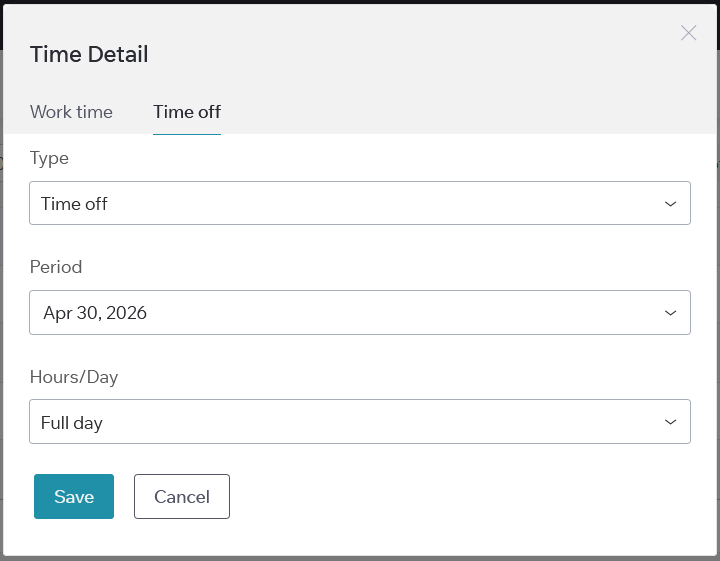
Work time tab
1. Select a task. If you opened the modal from a task, this field is pre-filled. If the task does not appear, use the search to find it.
2. Enter time in one of these formats:
- [number]h for hours
- [number]m for minutes
- [number]h [number]m for hours and minutes
- Or, you can set the Start and End time, and the Duration will be calculated automatically
- Maximum – 24 hours.
4. Choose a date (you can select both past and future dates).
5. Add a comment if necessary.
6. Click “Save” to log the time or “Cancel” to discard changes.
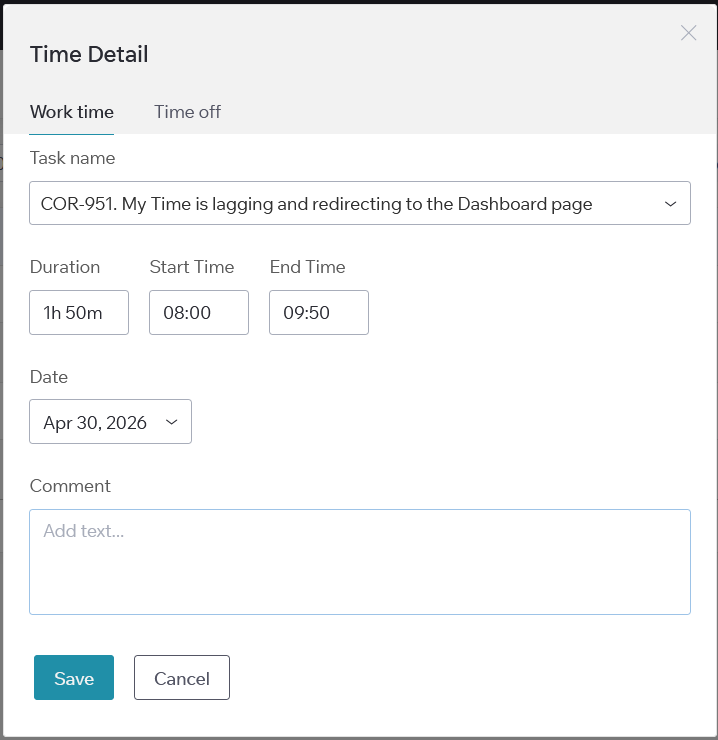
Time off tab
1. Select a reason from the Time off dropdown:
- Time off
- Sick
- Unpaid
2. Click the Period field (required), then choose a start and end date in the calendar.
You can pick any past, present, or future period. Today is selected by default.
3. Click “Save” to log the time or “Cancel” to discard changes.