
Corta Help Center

Knowledge Center

  • How Corta Works
  • Notifications Settings
  • Creating Tasks
  • Editing Tasks
  • Deleting Tasks
  • Quick Task View/Edit Page
  • Search Task Page
  • Comments
  • Steps
  • Task History
  • Time Tracker Tool
  • How To Log Time
  • Adding Time Via The Table
  • Logging Time Via Task Page
  • How To Edit Logged Time
  • How To Delete Logged Time
  • Viewing and editing time deductions for an issue per day
  • Viewing the written-off time in “Time off”
  • How To Find Projects
  • Sprints Page 
  • Active Sprints Page 
  • Overview Page 
  • Backlog
  • Project Activity Feed
  • Board Page/Kanban
  • Creating Projects
  • Editing Projects
  • My Tasks
  • My Activity Feed
  • Personal Notepad
  • What is the Admin Console
  • Members Management
  • User Roles And Permissions 

Deleting Tasks

Tasks can be deleted from the Quick task view/edit page and Task page.

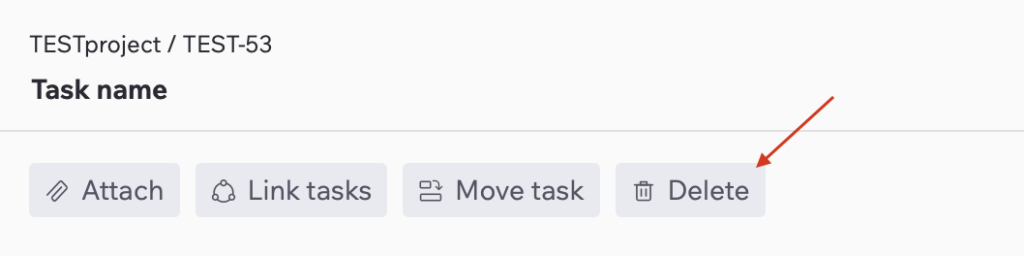
1. Open the task you want to delete.

2. Click the “Delete” button.
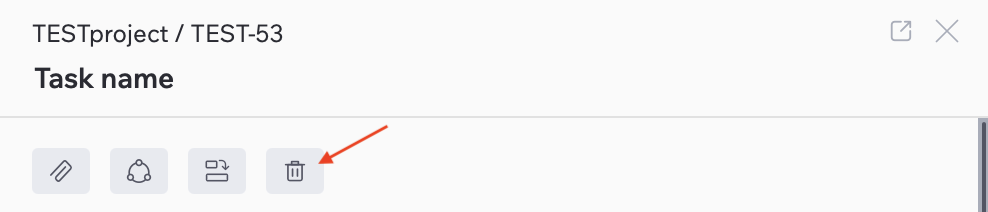
In the Quick Task view/edit page, you need to click the trash icon to delete the task.
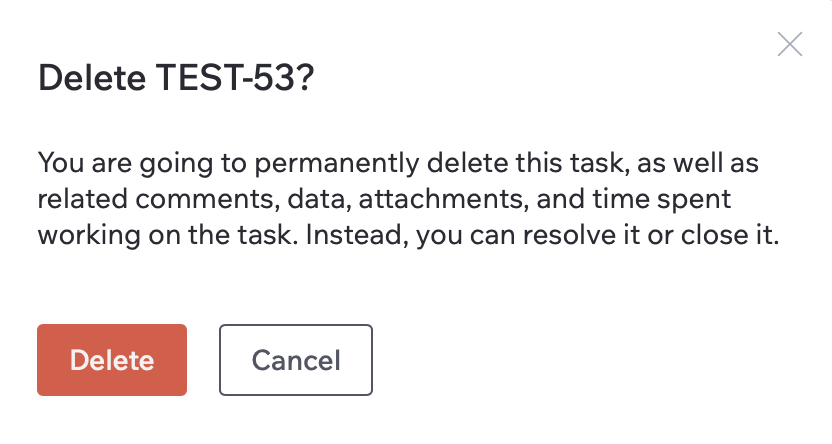
3. Confirm your action in the pop-up window by clicking “Delete”, or click “Cancel” or the “x” icon to discard.
Last Updated: Jul 3, 2025

Related articles

  • Creating Tasks
  • Editing Tasks
  • Quick Task View/Edit Page
  • Search Task Page
  • Comments

Still have questions? Let's talk

© 2026 Corta